
Download XDrawChem – Free Chemistry Drawing Tool for macOS
Overview
XDrawChem is a lightweight, open‑source (GPL) chemistry drawing program designed exclusively for macOS. Since its inclusion in our software roundup in 2012, XDrawChem has attracted more than 17,000 enthusiastic users, with a steady flow of daily downloads that demonstrates its ongoing relevance in scientific education and research. The current stable release, version 1.9.5, was last updated on 19 June 2012, and it continues to run smoothly on modern Mac hardware while preserving a classic Mac OS X feel.
XDrawChem’s primary purpose is to let students, teachers, and professionals create clear, publication‑ready chemical structures, reaction schemes, and molecular diagrams without the overhead of heavyweight commercial suites. Because it is distributed under the GNU General Public License, the software is completely free, can be modified, and encourages a community‑driven improvement cycle. Its modest installation footprint makes it ideal for machines with limited storage, and the intuitive interface ensures that users can focus on chemistry rather than learning a complex tool.
Whether you are drafting a lab report, preparing a presentation, or simply visualising a molecule for personal study, XDrawChem offers a secure, dependable, and cost‑free solution for macOS users.
Key Features of XDrawChem
- Intuitive Drawing Canvas: Click‑to‑add atoms, bonds, and functional groups with real‑time snap‑to‑grid alignment.
- Comprehensive Element Library: Supports all elements of the periodic table, including isotopes and charge states.
- Reaction Scheme Builder: Create multi‑step reactions, arrows, and reagents with layered editing.
- Export Options: Save diagrams as PNG, SVG, PDF, or EPS for seamless inclusion in papers, slides, and web pages.
- Template Support: Load and save custom templates for recurring structures such as benzene rings or amino acids.
- Free and Open Source: GPL‑licensed code allows users to audit, modify, and redistribute the software.
- Lightweight Footprint: Requires less than 30 MB of disk space and minimal RAM, making it suitable for older Mac models.
- Keyboard Shortcuts: Speed up workflow with shortcuts for common actions like bond type changes and atom insertion.
- Cross‑Version Compatibility: Runs on macOS 10.6 (Snow Leopard) through the latest macOS releases with Rosetta 2 support.
- Multi‑Language Documentation: While the interface is English‑only, comprehensive PDF guides are available for non‑English speakers.
Installation, Usage & Compatibility
Step‑by‑Step Installation Guide
Installing XDrawChem on your Mac is straightforward. First, download the latest .dmg file from the official project page. Once the download completes, double‑click the disk image to mount it.
Drag the XDrawChem icon into the /Applications folder, which copies the app to your system. macOS may display a warning because the software is not signed by Apple; simply click “Open” to confirm you trust the source. For users running macOS Catalina or later, you may need to allow the app under System Preferences > Security & Privacy by clicking “Allow Anyway” after the first launch attempt. After granting permission, launch XDrawChem from the Applications folder or Spotlight.
First‑Time Use and Workflow Tips
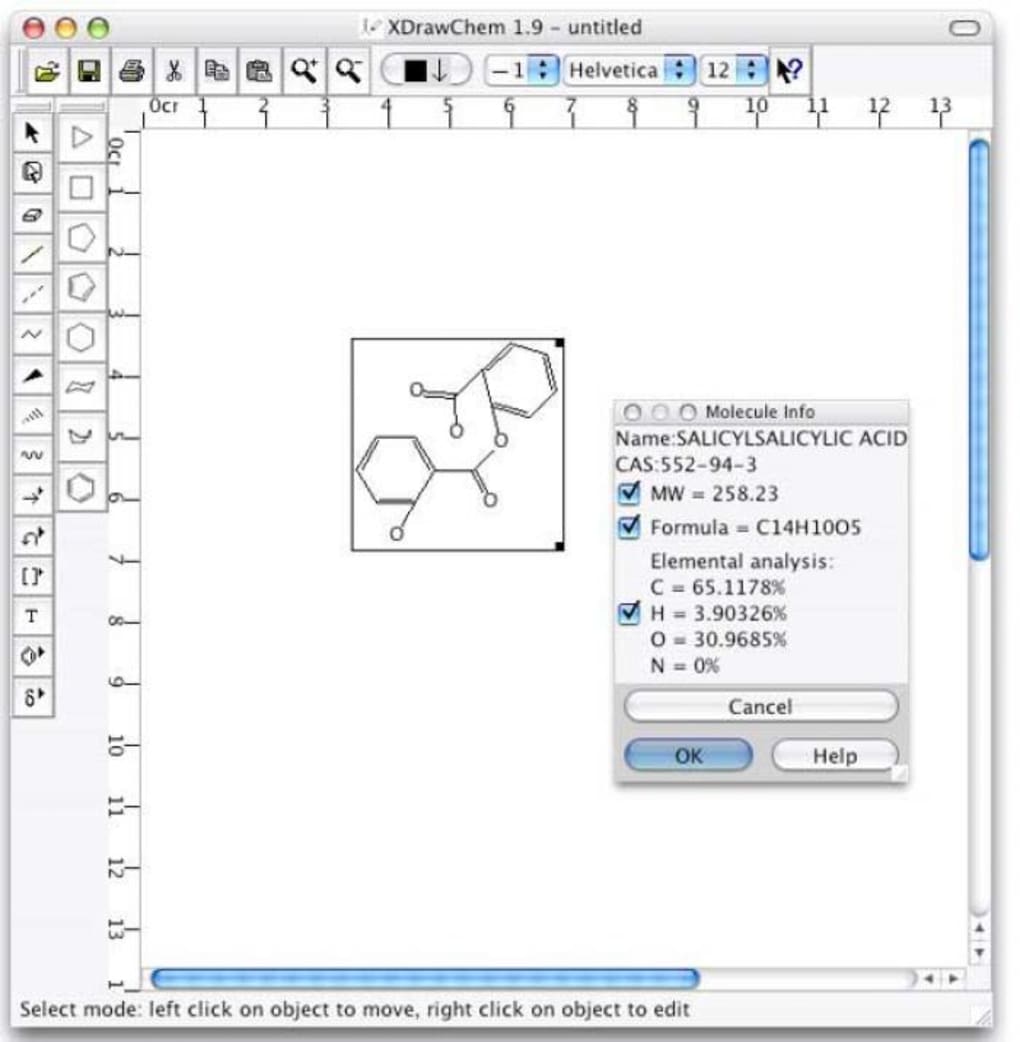
Upon opening XDrawChem, you are greeted with a clean canvas and a toolbar containing the most frequently used tools: atom insertion, bond types (single, double, triple, aromatic), charge modifiers, and text labels. To draw a molecule, select the desired element from the periodic table dropdown, then click on the canvas to place the atom. Click and drag to create bonds; the program automatically snaps to standard bond angles (120°, 180°, etc.) for aesthetically pleasing structures.
Use the “Ring” tool for quick generation of common cycles like benzene or cyclohexane. For reaction pathways, choose the “Arrow” tool, position the arrow between reactants and products, and add reagents as text boxes. When your diagram is complete, export it via File > Export and select your preferred format.
SVG is recommended for vector‑based publications, while PNG works well for presentations.
Operating System Compatibility
XDrawChem was originally built for Mac OS X 10.5 (Leopard) and continues to function on all subsequent macOS releases, including macOS 12 Monterey and macOS 13 Ventura. The application runs natively on Intel‑based Macs and, thanks to Rosetta 2, operates smoothly on Apple Silicon (M1, M2) devices. Users of older hardware will appreciate the program’s modest system requirements: a 64‑bit processor, at least 256 MB of RAM, and a modest amount of free disk space (approximately 30 MB). No additional libraries or frameworks are needed, making the installation process virtually frictionless.
Pros, Cons, Frequently Asked Questions & Conclusion
Pros
- Completely free and open‑source – no hidden fees or trial periods.
- Lightweight design ensures fast startup and low memory usage.
- Rich set of drawing tools tailored specifically for chemistry.
- Multiple export formats suitable for academic publishing.
- Cross‑compatible with both Intel and Apple Silicon Macs.
Cons
- Interface looks dated compared to modern commercial alternatives.
- Lacks built‑in 3D molecular visualisation.
- No native Windows, Linux, Android, or iOS versions – macOS‑only.
- Limited language support – English UI only.
- Last official update was in 2012, so newer macOS features are not integrated.
FAQ – Your XDrawChem Questions Answered
Is XDrawChem truly free or are there hidden costs?
XDrawChem is released under the GNU GPL, which means it is completely free to download, use, and modify. There are no hidden fees, subscription models, or paid upgrades.
Can I import existing chemical files (e.g., .mol, .cdx) into XDrawChem?
The current version does not support direct import of .mol or .cdx files. Users must recreate structures manually, although this can be expedited using the built‑in templates.
Will XDrawChem run on macOS Ventura (13) without issues?
Yes. While the app predates Ventura, it runs under Rosetta 2 on Apple Silicon and natively on Intel Macs. Users have reported stable performance, though some newer UI elements may appear out of place.
How can I contribute to the XDrawChem project?
Since XDrawChem is open source, you can fork the repository on GitHub, submit bug reports, or propose feature enhancements through pull requests. The community welcomes both code contributions and documentation improvements.
Is there a way to add custom element symbols or isotopes?
Yes. Advanced users can edit the configuration XML files located in the application bundle to add custom symbols, isotopic labels, or even new functional groups.
Conclusion – Should You Download XDrawChem?
If you are a chemistry student, educator, or researcher who works exclusively on macOS and needs a straightforward, no‑cost tool for drawing molecular structures, XDrawChem remains a solid choice. Its lightweight nature, robust export options, and open‑source ethos make it especially attractive for budget‑conscious institutions and individuals. While the UI may feel nostalgic and the lack of recent updates could be a concern for some power users, the core drawing functionality is reliable and continues to meet the essential needs of most academic workflows. Download XDrawChem today, give it a try, and decide for yourself whether this free macOS‑only app fulfills your diagramming requirements. For the most up‑to‑date version and community support, visit the official project page and join the discussion.







